
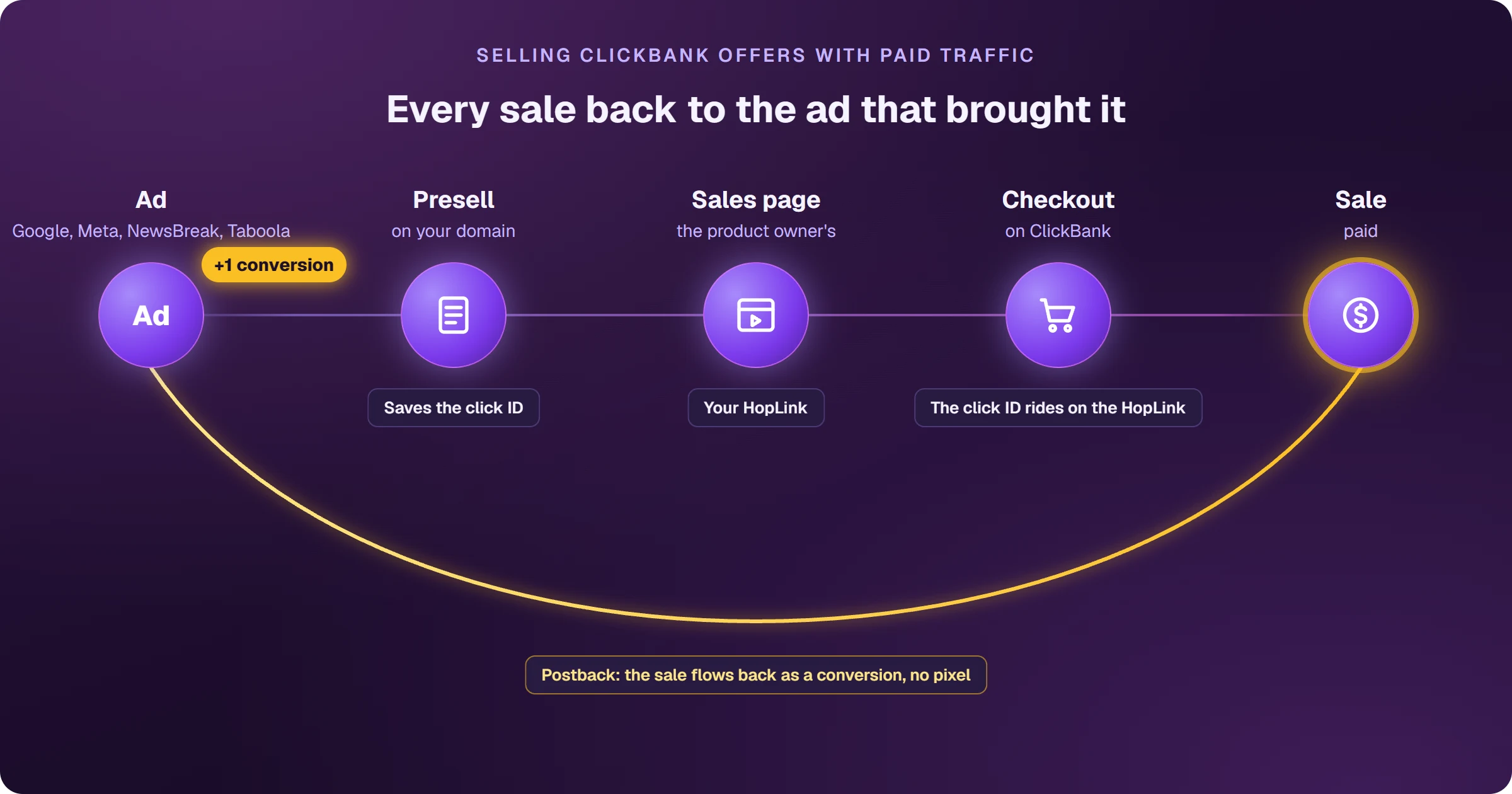
To sell ClickBank on Google Ads you need two pieces: a presell on your own domain, with its own content, that presents the product and sends the buyer to the sales page through your HopLink; and a way for each sale to flow back to your ad platform, tied to the click that produced it. The sale happens in the ClickBank checkout, where you can't install anything — it's ClickBank's postback that returns each sale as a conversion.
The sales page is ready. What's missing is knowing which ad sold
ClickBank products come with a sales page. What holds affiliates back is something else: the sale happens in a checkout that isn't yours, and your ad account only sees clicks. Without knowing which ad, keyword and audience brought each sale, you keep paying for clicks that don't sell — and Google has nothing to learn from.
Why not advertise straight to the sales page?
ClickBank itself suggests the direct offer link as the ad destination. The problem is that the sales page is the same for the product owner and for every affiliate of that product, and Google doesn't show more than one ad leading to the same site in the same auction: you compete with all of them for a single slot. A presell solves it: a page on your own domain, with its own content — a review, a comparison, a quiz — that warms up the buyer and sends them to the sales page through your HopLink. It can't be an empty page that only redirects; Google blocks that kind of page. The formats are in types of presell pages for Google Ads.
ClickBank bans bidding on third-party trademarks, and many product owners also ban advertising with the product name. Before building the campaign, read the offer's affiliate page.
How does a ClickBank sale flow back to your ad platform?
Through the postback. Under Postback/Pixels, you register an address that receives a notice on every sale (Initial Purchase) and every upsell (Upsell Purchase), carrying the parameters that were on your HopLink — tid, aff_sub1 to aff_sub5, extclid. If the click identifier is in one of those fields, every sale flows back to your ad platform — Google Ads, Meta (Facebook and Instagram), NewsBreak or Taboola — as a conversion, tied to the ad that produced it.
- ClickBank retries up to 3 times if your address responds with an error.
- Refunds don't come through this notice: the conversion stays counted.
- Test-card purchases don't trigger the notice — test with a real sale.
- ClickBank's own Google Ads integration also exists, but it needs the gclid on the HopLink and only serves Google.
A postback is the notice a platform sends, server to server, when a sale happens. Unlike a pixel, which needs code on the thank-you page, a postback doesn't need access to the checkout.
What if every ClickBank sale showed up in your ad platform on its own?
Today the do-it-yourself path is long: build the presell, host it on a domain, decide which parameter carries the click, set up the postback, check whether the sale arrived. Every week spent on that is a week of ads running blind.
With AdsX, the presell is generated automatically for the ClickBank product, on your domain, already leading to the sales page with your HopLink — and it's with this page that our users have been scaling ClickBank offers on Google Ads. Every sale shows up tied to the ad that brought that buyer, and the alert reaches your phone right away. Your ad platform — Google Ads, Meta, NewsBreak or Taboola — receives those sales and starts looking for people like the ones who bought: the more sales come in, the more the account learns, and that's what lets you raise your budget with confidence. It all happens on its own, with no spreadsheets. To connect ClickBank to AdsX, visit the integration page.
AdsX was built to help advertisers create and manage campaigns in compliance with Google Ads policies. The platform does not support or allow any mechanism to bypass ad review systems.
Frequently asked questions
Does ClickBank have a Google Ads pixel?
It has its own Google Ads integration, which needs the gclid on the HopLink. To send the sale to Meta, NewsBreak and Taboola as well, the way is Postback/Pixels, with the click identifier in the link parameters.
Can I put my HopLink straight into the ad?
You can, but you'll compete in the auction with the product owner and every other affiliate leading to the same site, and Google only shows one of them. With a presell on your own domain, the ad is yours alone.
Does a refund remove the conversion in Google Ads?
Not through the postback: ClickBank doesn't send refund notices that way. Track refunds in your ClickBank dashboard.
Read next
- How ClickBank works and how affiliates earn
- How to create a ClickBank account without getting declined
- How to choose a ClickBank product: the numbers that matter
- How to get paid by ClickBank: payout days, fees and the first payment
- ClickBank account disabled: why it happens and what to do
Where do you access ClickBank?
These are the official ClickBank addresses. Check that your browser shows accounts.clickbank.com before typing your password.
Sources
Information checked on October 25, 2026, on the official ClickBank pages below.
- Tracking integration: Google Ads
- Postback/Pixels integration guide
- Affiliate tracking parameters
- Prohibited seller and affiliate activities
Want to know which ads bring ClickBank sales?
Every sale shows up tied to the ad that brought it, and the sale alert reaches your phone.