
To choose a ClickBank product, compare four numbers in the marketplace: what you earn per sale (Avg $/conversion), how many affiliates sell it (Gravity), how much of the sales come back as refunds (Return Rate) and how much each click earns (EPC). Gravity shows what's selling right now — and how much competition you'll face. Then open the sales page and see whether it convinces you.
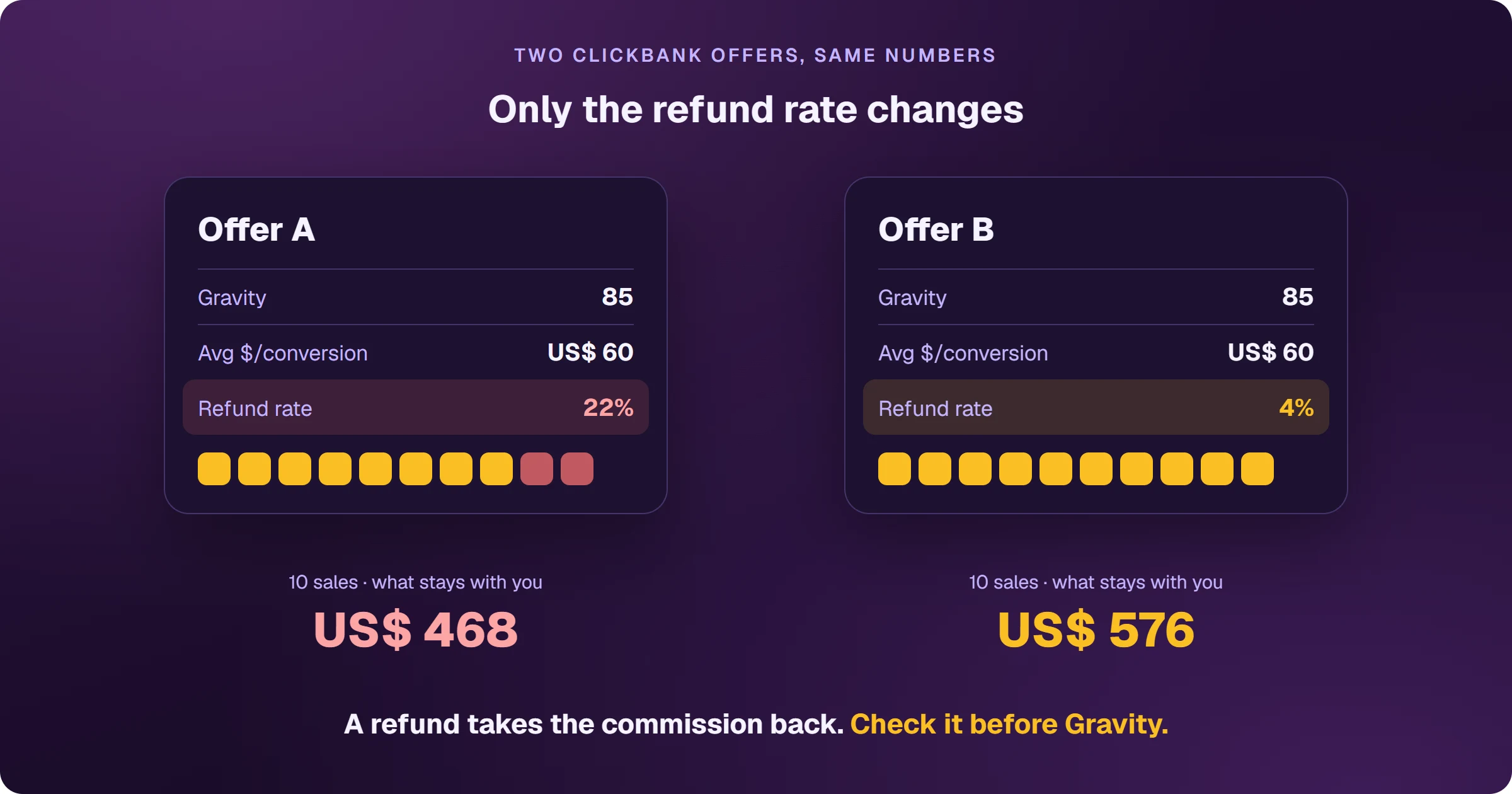
High Gravity fools anyone who looks at nothing else
Almost every beginner's first filter is to sort the marketplace by Gravity and grab the top result. But high Gravity means many affiliates selling — in other words, many people competing for the same buyer. And it doesn't show how much of the sales come back as refunds, which on percentage commissions take your share with them.
What do the ClickBank marketplace numbers mean?
- Gravity: a ClickBank calculation based on how many different affiliates earned a commission on the product over the last 90 days, weighted toward recent sales. High = hot product and more competition.
- Avg $/conversion: the average net commission per sale over the last 90 days, including the initial sale and rebills.
- Initial $/conversion: the same average without rebills — initial sale, order bumps and upsells.
- Future $/rebill: what subscriptions pay later, per sale, within 90 days.
- EPC: how much commission each click earned over the last 30 days.
- Conversion Rate (CVR): the share of clicks that turned into a sale over the last 30 days.
- Return Rate: the share of sales from the last 120 days that were refunded or charged back.
- Rank: the overall position, combining commission, conversions, affiliate volume and sales volume.

Where to start your search
With the categories at the top — Health & Fitness, E-Business & E-Marketing, Self-Help and others —, with New Offers, which lists products activated in the last 30 days, or with Top Offers. ClickBank itself recommends narrowing your niche: the more specific it is, the less competition and the clearer the audience.
Refunds weigh differently depending on the commission. On revenue share, the commission on a refunded sale is reversed. On CPA (a fixed amount), you keep it. That's why Return Rate matters most on percentage-commission products.
How do you get the product's HopLink?
On the offer you picked, click Get Affiliate Link, enter your nickname, choose which of the product owner's pages the link should lead to and copy the generated link. Some product owners require approval first. To measure where sales come from, add ClickBank's tracking parameters to the end of the link.
Frequently asked questions
What is a good Gravity on ClickBank?
ClickBank doesn't set a number. High Gravity shows the product is selling now, but also that there's more competition; always read it together with commission per sale, EPC and refund rate.
Do I need an account to browse the marketplace?
No. The marketplace is public. You only need an account to generate the HopLink — see how to create a ClickBank account.
Planning to promote with Google Ads? The ad needs a page of your own before the sales page, and each sale needs to flow back to your ad platform. See how to sell ClickBank on Google Ads.
Read next
- How ClickBank works and how affiliates earn
- How to create a ClickBank account without getting declined
- How to get paid by ClickBank: payout days, fees and the first payment
- ClickBank account disabled: why it happens and what to do
- How to sell ClickBank on Google Ads and see every sale
Where do you access ClickBank?
These are the official ClickBank addresses. Check that your browser shows accounts.clickbank.com before typing your password.
Sources
Definitions checked on October 25, 2026, in the marketplace and on the official pages below.
- Marketplace FAQ: Gravity, statistics and affiliate link
- How to use the Marketplace stats
- How do I decide what to promote
- Commission on refunded sales
Planning to sell ClickBank products as an affiliate?
The presell comes ready on your domain and leads to the sales page, every sale shows the ad that brought it, and the sale alert reaches your phone.