
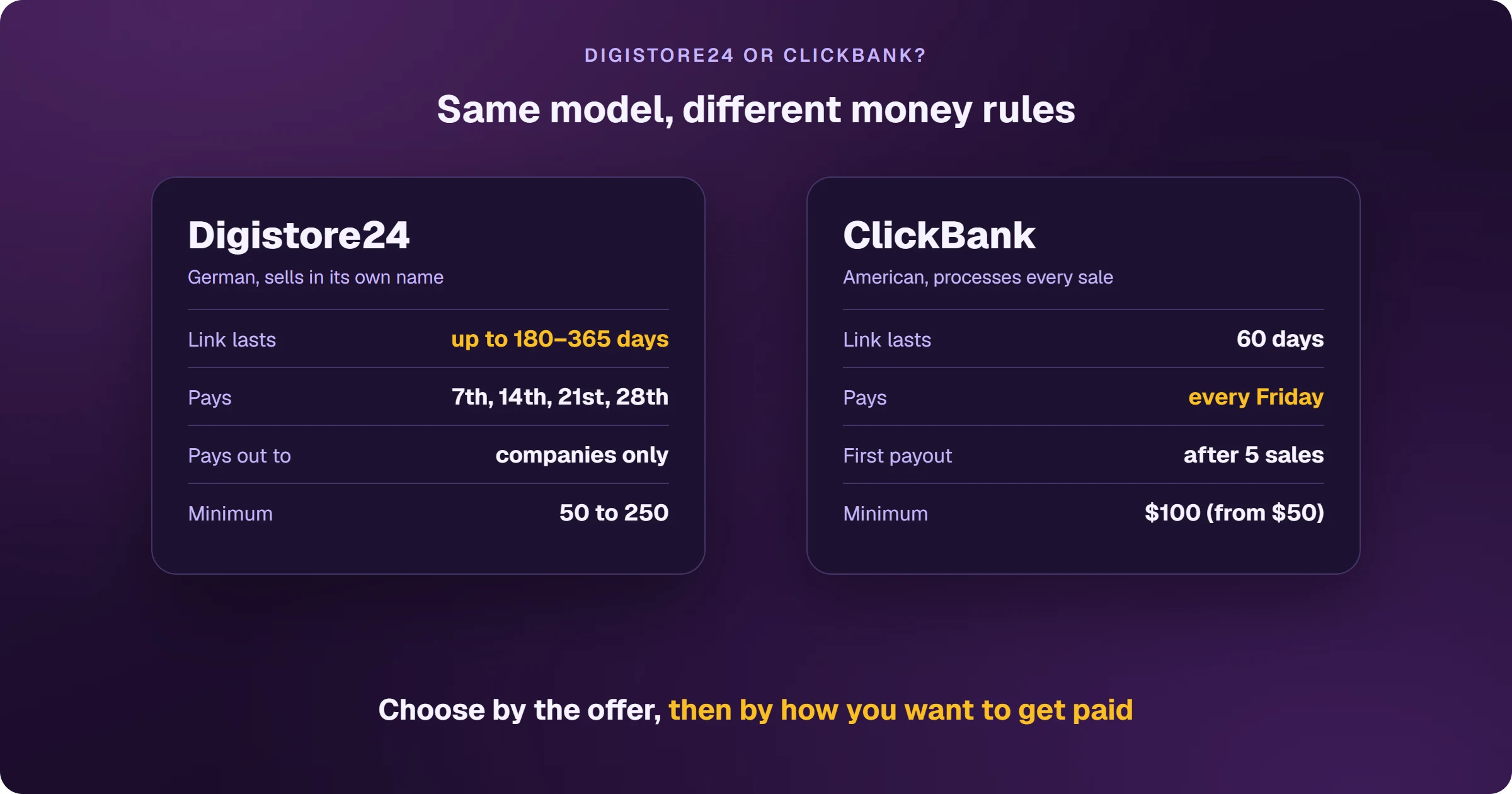
Digistore24 and ClickBank share the same model: open sign-up, products with ready sales pages and percentage commissions. What differs is the money and the link. On Digistore24, the link lasts up to 180 days (365 in regions like the US), payouts go out on up to four dates a month and only to companies. On ClickBank, the link lasts 60 days, payouts go out every Friday and the first one needs 5 sales from different customers.
The comparison that matters isn't the catalog
Both have thousands of offers, many in the same niches — health, wealth, relationships. Comparing catalogs gets you nowhere. What changes your day-to-day are three things: how long your link lasts, when the money goes out and what you need in order to receive it.
How do Digistore24 and ClickBank compare?
Link duration
Digistore24: up to 180 days from the first visit in regions with stricter privacy rules, such as Europe, and up to 365 days in regions like the US. ClickBank: 60 days after the click. On both, the sale goes to the last affiliate the buyer clicked.
Schedule and minimum
Digistore24: the 7th, 14th, 21st and 28th, with a minimum of 50 on the 7th, 200 on the other dates and 250 for international transfers; each sale releases 90% after 14 days and 10% after 60. ClickBank: every Friday (or every other), with a default $100 minimum adjustable from $50, and 10% held for about 84 days.
Who gets paid and how
Digistore24: companies only, by PayPal, international transfer or Payoneer in USD. ClickBank: direct deposit (India is on the list), wire or check, no PayPal; the first payout needs 5 sales from different customers, each over 14 days old, with more than one payment method.
Marketplace
Digistore24: inside the dashboard, with earnings per sale, cart conversion and cancellation rate; some partnerships are accepted instantly, others go through the vendor. ClickBank: public, with Gravity, earnings per conversion, EPC and refund rate.
Which one should you choose?
- Choose by offer: what matters is what it pays and whether it converts with your traffic.
- Does your traffic take a while to convert (readers who come back days later)? Digistore24's longer link helps.
- Want weekly payouts early on? ClickBank pays every Friday once the first payout is unlocked.
- No company yet? Sort it out before selling on Digistore24 — without one, commissions don't get paid.
- Already on both: if the same offer exists on both, compare commission and refund rate.
On both, Google Ads advertisers need a page on their own domain before the sales page and a way to see every sale flow back to their ad platform. See how to sell Digistore24 on Google Ads and how to sell ClickBank on Google Ads.
Read next
- How Digistore24 works and how affiliates earn
- How to sign up for Digistore24 and get your account ready to be paid
- How to choose a Digistore24 product: the marketplace numbers
- How to get paid by Digistore24: payout dates, minimums and methods
- How to sell Digistore24 on Google Ads and see every sale
Where do you access Digistore24?
These are the official Digistore24 addresses. Check that your browser shows digistore24.com before typing your password — after you log in, the dashboard opens on digistore24-app.com.
Sources
Rules for both platforms checked on October 25, 2026, on the official pages below.
- Use promolink: format, cookie and attribution
- Payout: set dates and thresholds
- Your most important questions regarding your payouts
- Payout: set method and currency
- ClickBank accounting policy (Friday payouts, threshold and first payment)
- ClickBank HopLinks guide (60 days)
Want to know which ads bring Digistore24 sales?
Every sale shows up tied to the ad that brought it, and the sale alert reaches your phone.