
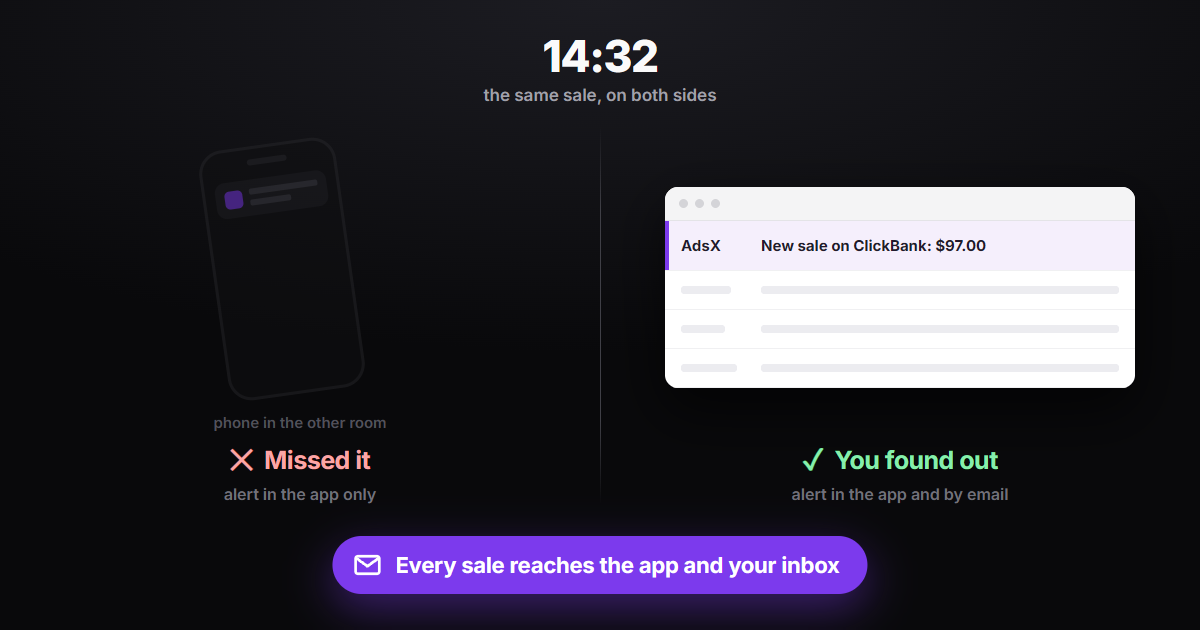
A phone notification only works when the phone is with you — and affiliates running Google Ads spend most of the day at the computer, with the phone face down on the desk or charging in another room. That's why AdsX now alerts you about every sale by email too, on top of the AdsNotify app. Email alerts are on by default: every sale recorded in your account sends a message with the platform, product, amount and time, within seconds. Checkout alerts by email exist as well but start switched off, and both are managed on the Notifications screen of the dashboard.
The sale you only discover at the end of the day
Knowing about a sale right away isn't about vanity. It tells you whether the ad you launched this morning is already converting, whether the campaign you scaled yesterday responded, or whether the network stopped sending sales and you need to check the integration before spending more. If you only find out at night, scrolling the dashboard, you've lost the moment to act: the budget ran all day on stale information. A single alert channel has a predictable weak spot — the day it fails is exactly the day you don't notice it failed.
AdsNotify is the AdsX phone app (iPhone and Android) that sends a notification the moment a sale or checkout is recorded in your account. Email alerts are a second, independent channel: they arrive even if you never installed AdsNotify.
Does AdsX send sale alerts by email?
Yes. Since October 2026, every sale that reaches your account through the network's postback or through AdsPixel triggers an email to your AdsX account address. The sender shows as "AdsX" and the subject line already carries the essentials, such as "New sale on ClickBank: $97.00" — you know what happened without opening it. Inside you'll find:
- The network where the sale happened — ClickBank, Digistore24, MaxWeb, BuyGoods and the other networks integrated with AdsTracking.
- The product name, when the network sends it.
- The amount, formatted in the sale's currency.
- The date and time it was recorded, with the time zone spelled out (UTC in English emails).
- A button that opens your sales screen in the dashboard.
The email arrives within seconds of the sale being recorded, and sending it is separate from receiving the sale: if an email is delayed or fails, the sale is still saved and counted in the dashboard as usual.
Sales on, checkouts optional
Both email alerts are managed on the Notifications screen, in the dashboard sidebar, with one on/off switch each.
Sales: already on
There's nothing to set up. Every account starts receiving sale emails automatically.
Checkouts: your call
A checkout is when a buyer starts paying but hasn't completed the payment yet. On some offers this happens many times a day, and one email for each would flood your inbox. That's why checkout alerts start off: if you want to follow that activity, turn it on with one click.
A checkout is not a sale yet: the payment hasn't been confirmed. The checkout email says so right at the top, so nobody celebrates too early.
Email plus app: alerts that don't depend on where you are
Email doesn't replace AdsNotify — they complement each other. The app notification is the fastest when the phone is in your hand. Email covers the rest of the day: it lands in the inbox open on your computer, stays there for reference and can be searched later by network or product name. With both on, a sale only slips by if you check neither your phone nor your email.
Two independent channels for every sale: a notification in the AdsNotify app and an email in your inbox, the latter on by default for every account that tracks sales.
If you don't use the app yet, the setup steps are in the help center, at help.adsxapp.com, in the article "How to Install AdsNotify and Get Sales Notifications on Your Phone". Every sale email links to that article too.
Frequently Asked Questions
Do I need to set anything up to get sale emails?
No. Sale alerts by email are already on. They go to the same address you use to log in to AdsX.
How do I stop the emails?
Two ways: the "Stop these emails" link at the bottom of any alert, which turns them off without logging in; or the Notifications screen, where you can also turn them back on anytime. Turning off emails doesn't affect AdsNotify app notifications.
Which plans get email alerts?
Every AdsX plan that tracks sales. The email is sent from the sale recorded by AdsTracking, so if sales show up in your dashboard, you get the alert too.
Do test sales from the network trigger an email?
Yes. When you test the postback on the network, the email confirms the integration is working, just like the app notification does.
Conclusion
Knowing about a sale right away is what lets you react the same day — scale what's working, pause what isn't, and get suspicious when sales stop coming in. With email alerts on by default and AdsNotify on your phone, AdsX now tells you about every sale through two channels, and what you need to do for that is nothing.
Follow every sale in real time
Sales tracking across 20+ networks, with an alert in the app and by email for every sale recorded.