

Bidding on a high-demand product name puts you in the most crowded auction on Google Ads: every other affiliate promoting that offer is bidding on the exact same term. Alternative keywords are the way around that crowd — they are the variations people type when they get the name wrong, like 'citrus barn' instead of 'Citrus Burn'. Identical buying intent, almost no competitors, a far lower CPC. This article walks through the full method: generating the variations, finding out which ones people actually search for, and launching the campaign.
Someone who misspells the name wants to buy the same thing
Picture a buyer opening Google at eleven at night and typing the name of a product they just saw in an ad. That person has already decided. They are not researching 'best fat burner' — they are looking for one specific product by name. It is the hottest bottom-of-funnel traffic there is, which is exactly why the auction is packed.
Now picture that same person typing fast on a phone. A letter drops, a vowel disappears, two keys swap places. Google serves a results page for that spelling too — and almost nobody is advertising on it. The buying intent is identical. The cost per click is not.
An alternative keyword is a spelling variation of the product name — a typo, a phonetic swap, a dropped or doubled letter — added to your campaign as an ordinary keyword. There is nothing special about the setup: it is a regular keyword that almost nobody thought to buy.
What are alternative keywords in Google Ads?
They are the spellings that come out when a product name passes through the keyboard of a real person in a hurry. They follow predictable patterns, and recognising the pattern explains why the search volume exists at all:
- Dropped letter — a character disappears while typing fast: 'citrs burn'
- Adjacent key — the finger lands on the neighbouring key: 'citrusv burn'
- Phonetic swap — the person writes what they heard: 'sitrus burn'
- Doubled letter — the key stays down a millisecond too long: 'citrus burnn'
- Transposition — two letters trade places: 'citurs burn'
How to generate the variations for your product
Inside AdsX the path is Products → Keywords → Alternative Keywords. Pick the product, check the original keyword — it comes prefilled with the product name — choose the language of the country you advertise in, and click Search.
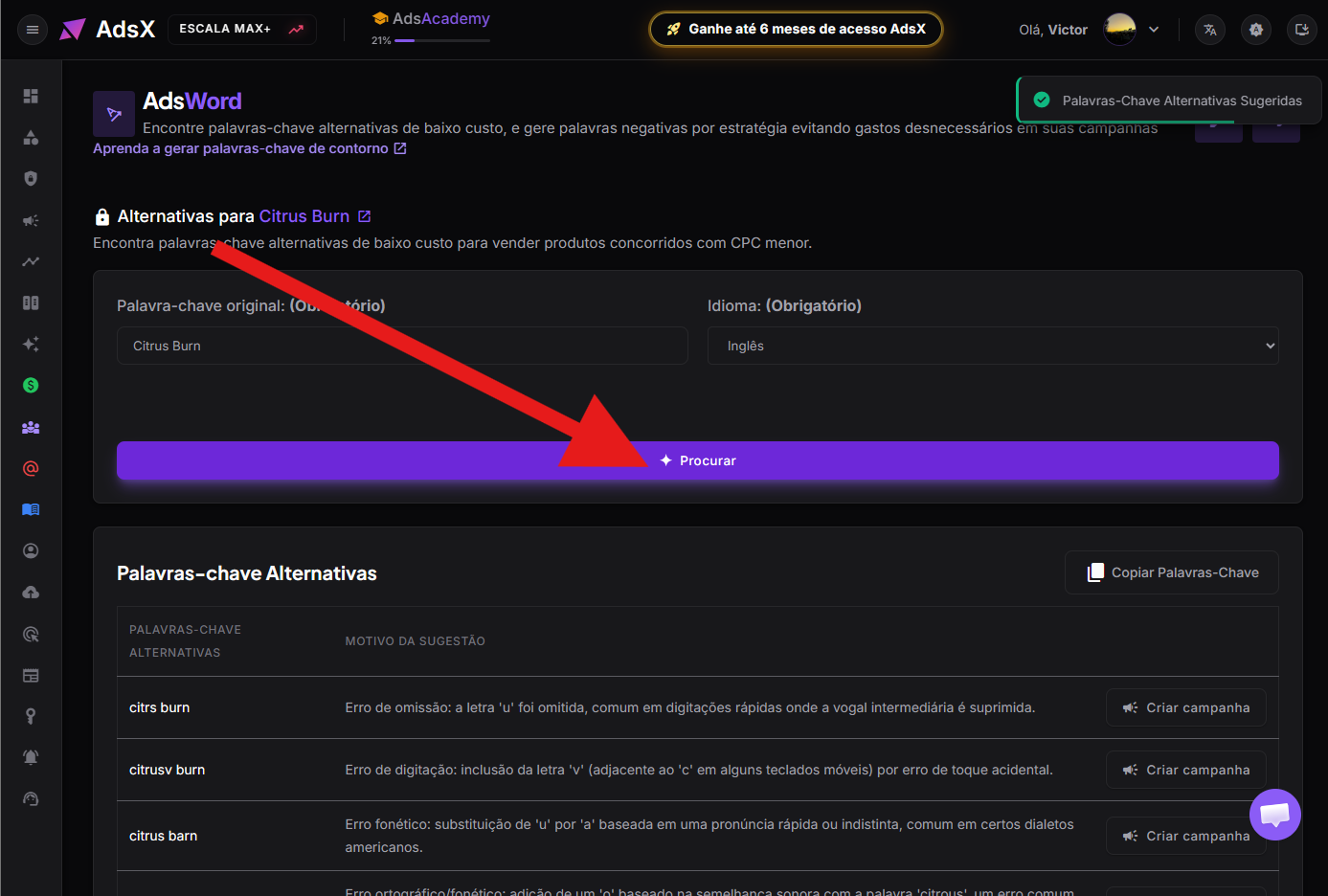
Most of these keywords get no searches at all
This is the step that separates the affiliates who get results from the ones who abandon the technique believing it does not work. The tool gives you the possible variations. Only Google knows which ones people actually type — and most of them nobody types.
Click Copy Keywords to grab all of them at once.
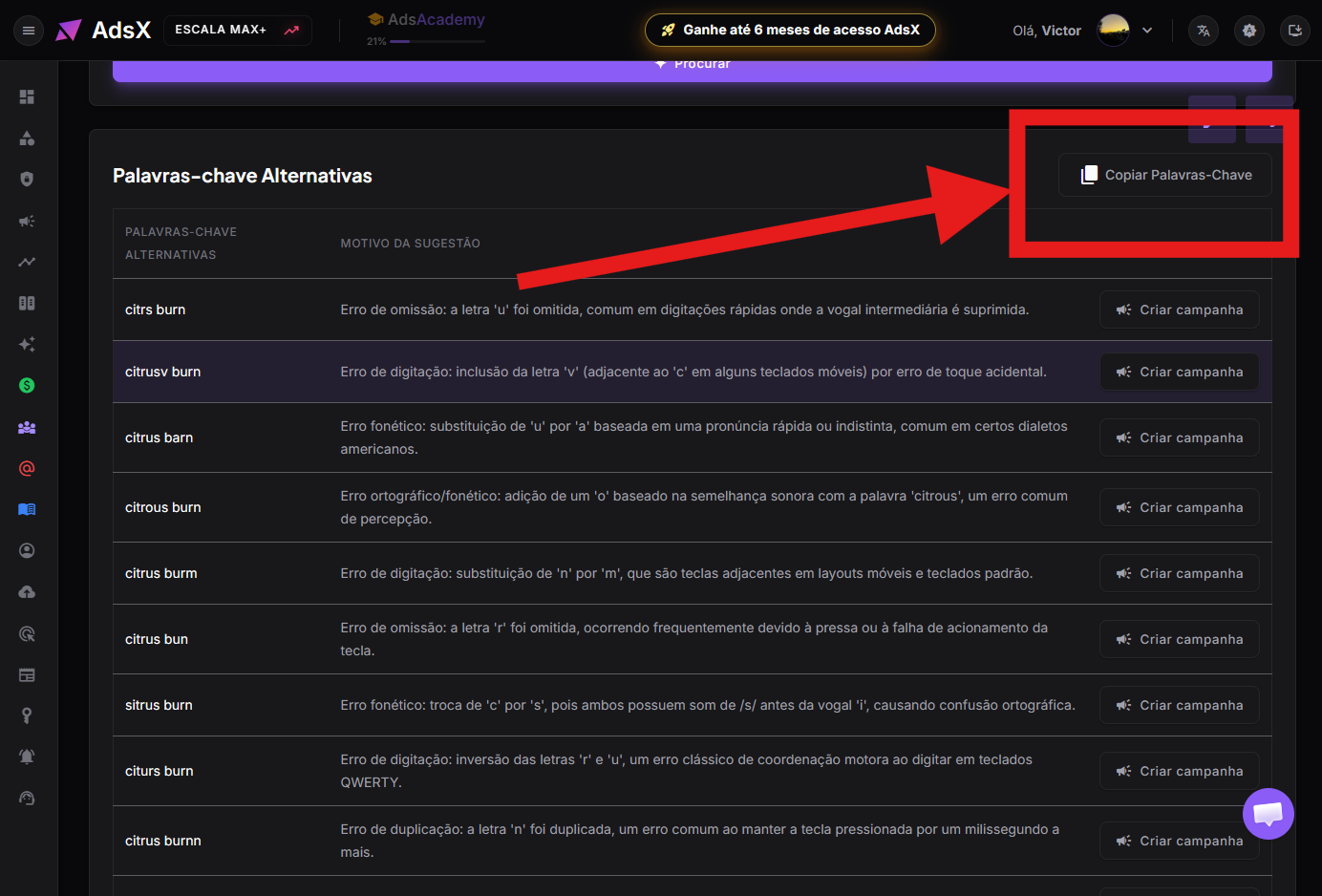
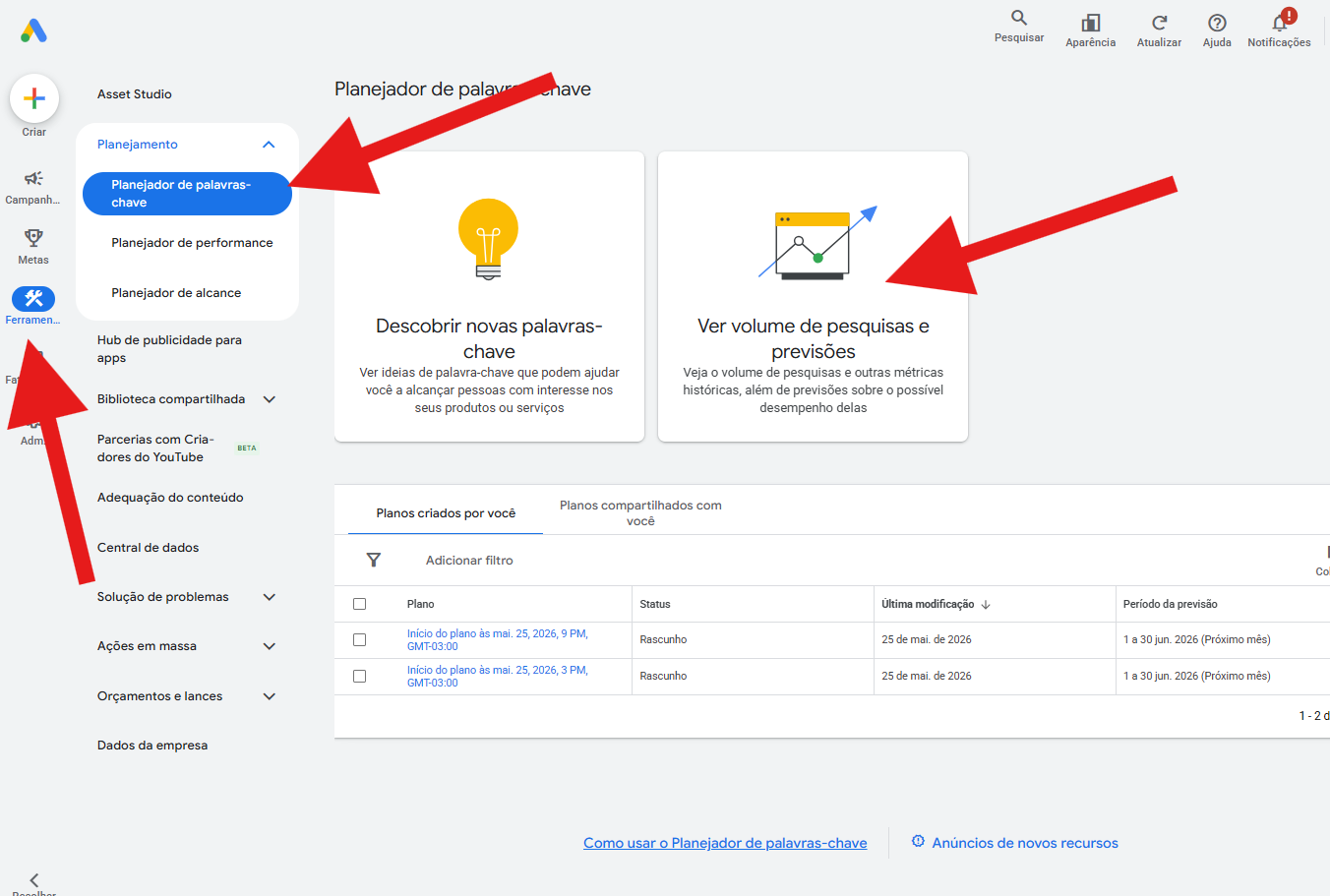
In Google Ads, go to Tools → Planning → Keyword Planner and open 'Get search volume and forecasts'.
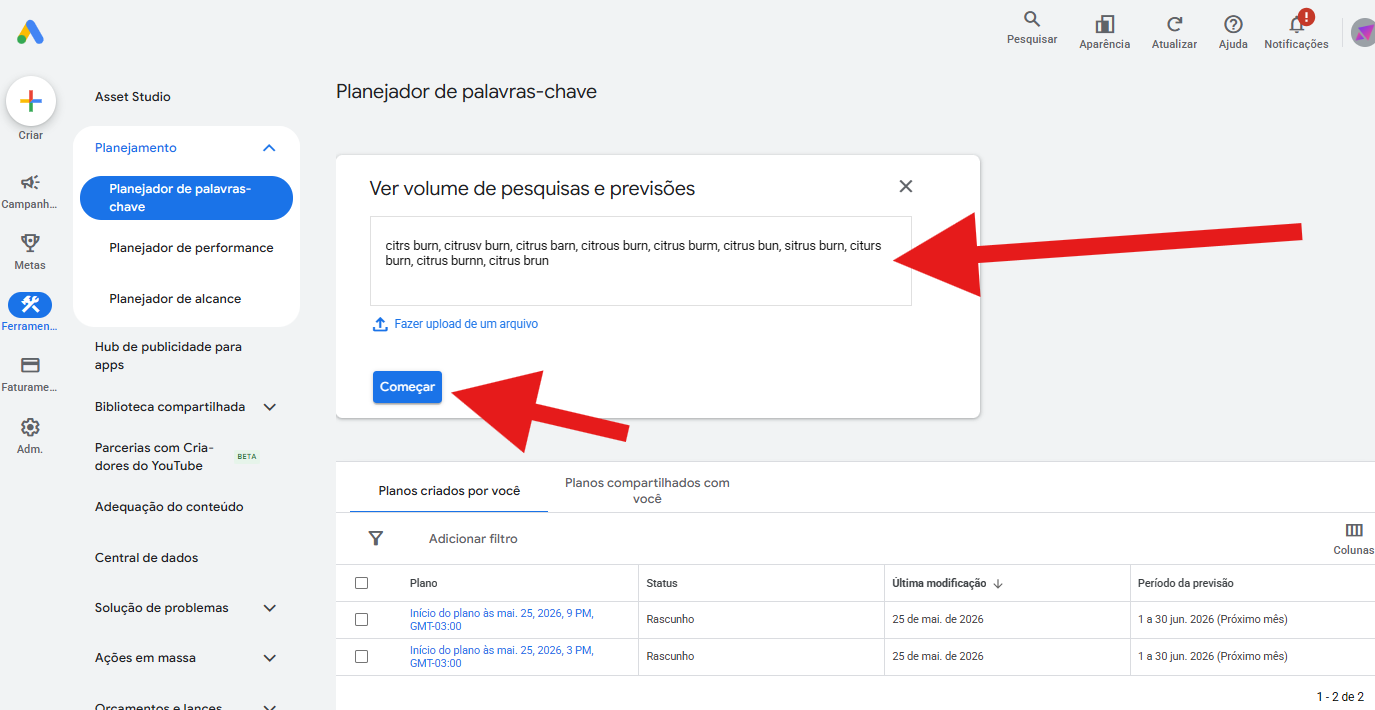
Paste the whole list and click Get started.
Open the 'Saved keywords' tab and read the 'Avg. monthly searches' column. That column decides everything.
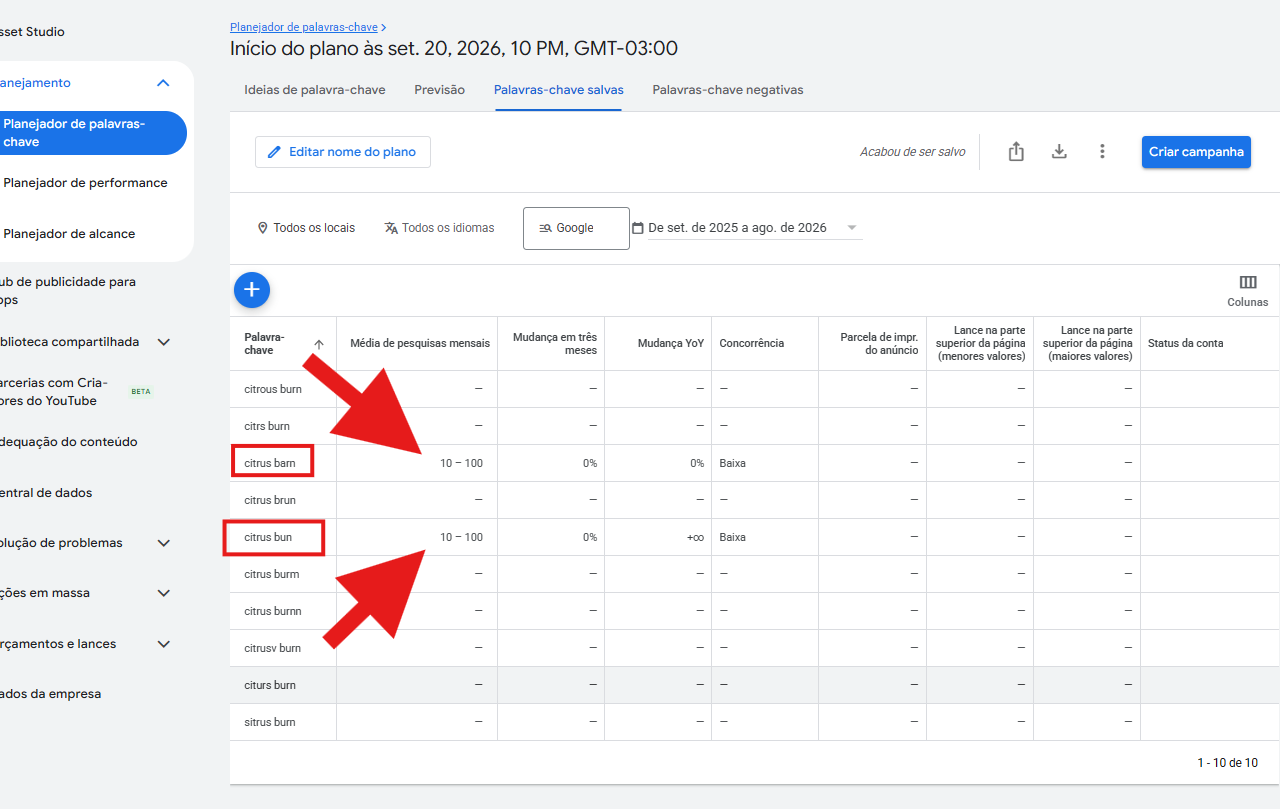
In a real test with the product Citrus Burn, only two of the ten generated variations had any search volume: 'citrus barn' and 'citrus bun', both showing 10 to 100 monthly searches and competition rated Low by Google's own Keyword Planner. The other eight came back with a dash — nobody looks for them.
Low volume is not a flaw: being rarely searched is precisely why the keyword is cheap. The mistake that kills this strategy is a different one — launching a campaign on a variation that came back with a dash. A keyword with no searches generates no impressions, so the campaign sits still while you believe you are testing.
Launching the campaign with the keyword that survived
Go back to the Alternative Keywords screen and click Create campaign on the row of the keyword that had volume. AdsX saves that keyword to the product and takes you straight into ad creation with it already filled in.
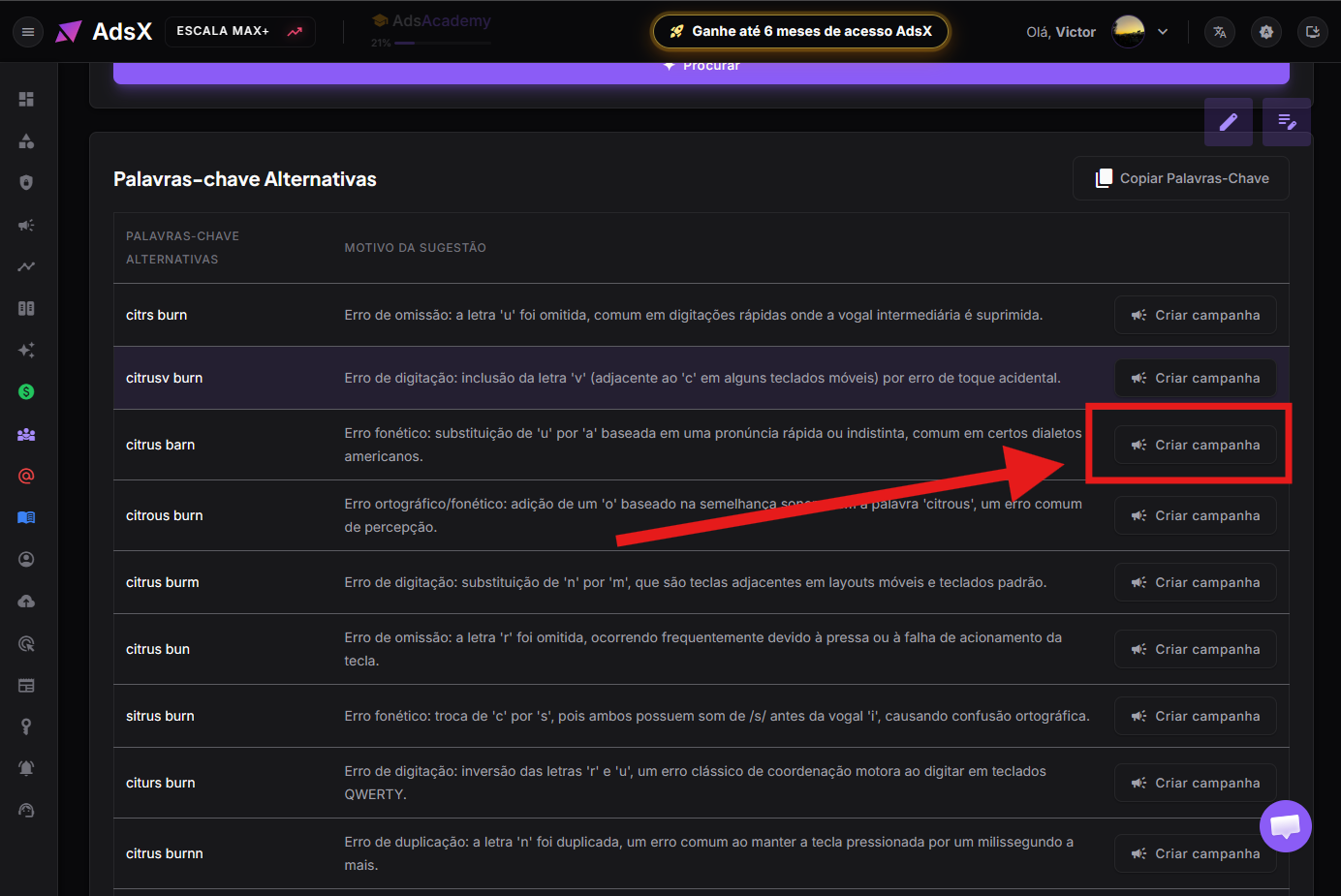
From there the flow is the usual one: AdsCreator writes the copy and assembles the campaign. Each product holds one alternative keyword at a time — clicking Create campaign on a different row replaces the previous one.
What you trade for that cheap click
Be honest about the maths before you launch. Google scores the relationship between your keyword, your ad copy and your landing page to produce the Quality Score. Because an alternative keyword is a misspelling of the product name, that relationship is never perfect: this ad is expected to fall short of excellent quality.
The trade is deliberate. You accept a lower score in an auction where there is barely any competition — and in an empty auction your cost is set low by the lack of bidders, not by the merit of your score. That is why the maths usually works in your favour even with a mediocre Quality Score. What you should not do is expect this technique to perform like a campaign on the exact product name: they are different games.
Quality Score is the 1-to-10 rating Google assigns to the relevance of your keyword, ad and landing page together. It influences cost per click and ad position, but it is not the only factor: the number of competitors in the auction weighs just as heavily.
Frequently Asked Questions
Does Google Ads allow bidding on misspelled keywords?
Yes. Spelling variations are ordinary keywords, added exactly like any other. There is no special setting and no policy exception involved — you are simply buying a search term that exists and that almost nobody competes for.
Why not advertise on every variation at once?
Because most of them get no searches. Adding ten variations when only two receive traffic fills your campaign with keywords that will never serve an impression, clutters your reports and makes it harder to see what is actually working. The Keyword Planner exists to make that cut beforehand.
Is 10 to 100 searches a month worth the effort?
It depends on your payout and conversion rate, but remember these are bottom-of-funnel searches: someone typing the product name, even incorrectly, has already decided to buy. A handful of very cheap clicks with high intent often returns more than the same budget burned in a crowded auction.
Do I need a different presell page for the alternative keyword?
No. The landing page stays the same as the one for the product, and it should — the visitor searched for that product and needs to find it. The only thing that changes is the keyword bringing them there.
In short
Generate the variations under Products → Keywords → Alternative Keywords, copy them all, paste them into the Google Ads Keyword Planner and read the average monthly searches column. Discard everything that came back with a dash and launch a campaign only for what shows a number. It is a two-minute filter that turns a list of guesses into one or two keywords with a real buyer waiting on the other side.
Launch your alternative keyword campaign in minutes
AdsCreator writes the copy and assembles the full campaign from the keyword you picked — in more than 50 languages.