
Anyone managing campaigns opens the dashboard well outside office hours: in the morning, in a bright room, and late at night, with the lights off. A fixed theme serves one of those hours well and gets in the way during the other — and remembering to switch by hand, twice a day, is exactly the sort of thing nobody does. That is the problem automatic mode solves: in the AdsX dashboard it keeps the screen light from 6am to 6pm and dark from 6pm to 6am, following your own computer's clock, without you touching anything. Fixed light and dark are still one click away, on the button in the top right corner.
Paid traffic has no closing time
Two profiles arrive at the same place from opposite directions. Affiliates promoting to another time zone watch campaigns in the middle of the night, because that is when the traffic on the other side happens. Those with a day job touch their accounts after dinner, because that is the time left over. Either way the dashboard sits open at the ends of the day, and that is where a fixed theme charges you: a white screen in a dark room tires your eyes fast, and a dark screen with sunlight on it flattens the difference between the numbers in a table. Neither is a serious problem — it is a small discomfort, repeated daily, that you settle once and stop thinking about.
An automatic theme is one where the interface switches between light and dark on its own as the day goes by, instead of staying locked to either. The hour comes from the device you are using, not from a server.
The three modes
The theme button sits at the top of the screen, on the right. Each click moves one step through the cycle: light, dark, automatic, and back to light. To check which mode you are on without clicking, hover over the button — it shows the name of the current mode.
Light mode
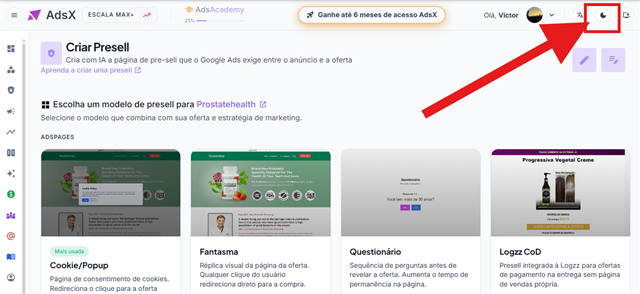
A white background at all times, regardless of the hour. It is the choice for anyone working in a bright room or who prefers high contrast all day. With light mode on, the button shows a moon — the next mode in the cycle.
Dark mode
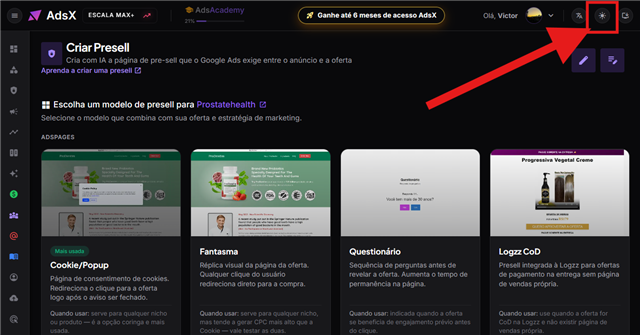
A dark background at all times. This is the mode you get the first time you sign in to AdsX, and the favourite of anyone spending hours looking at charts and tables at night. Here the button shows a sun.
Automatic mode
The dashboard follows your computer's clock: light from 6am to 6pm and dark from 6pm to 6am. The button shows a sun with the letter A inside it, and keeps showing that same icon by day and by night — that is how you know you are on automatic rather than on one of the fixed modes.
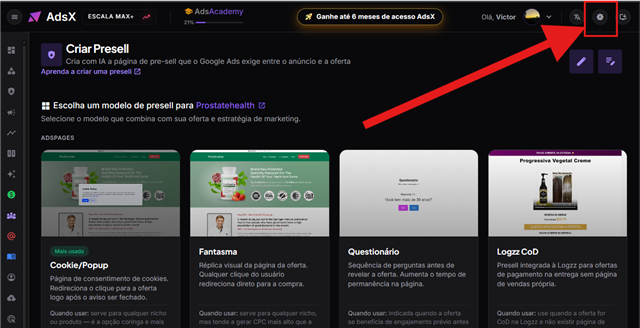
With the dashboard open, the 6am and 6pm switch happens on its own, at the exact moment — no page reload and no signing in again.
Where the hour comes from
From the clock on the device you are using, not from an AdsX server. In practice that is the right behaviour: if you live in one country and advertise to another, the dashboard follows your day, not the day of the market you serve. And if you travel, automatic mode picks up the local time zone as soon as your computer's clock adjusts.
The trade-off is that automatic mode inherits any error in your device's clock. If the system time is fast, slow or set to the wrong time zone, the dashboard will switch themes at the wrong hour — and the problem is the clock, not AdsX.
Where your choice is stored
In the browser you are using. It survives closing the tab, shutting down the computer and signing in again, but it does not travel with your account: if you open AdsX on another computer, in another browser or in a private window, the dashboard starts in dark mode until you switch again. The same applies if you clear the site's data in your browser.
Frequently Asked Questions
Does AdsX have a dark mode?
It does, and it is the default — the dashboard opens dark the first time you sign in. Alongside it there is a light mode and an automatic mode that alternates between the two according to the hour.
Can I change the switching hours?
No. The hours are fixed at 6am and 6pm. If you want different behaviour, the way to get it is to pick light or dark mode and leave it fixed.
Will the theme change while I am working?
Only if you are on automatic mode, and only at the two switching points. On light and dark mode nothing changes unless you click the button.
Does dark mode apply to every screen?
Yes, the theme applies to the whole dashboard — reporting, sales, presells, domains and the settings screens. The step by step with a screenshot of each mode is also in the help centre, at help.adsxapp.com, in the article "How to change the AdsX theme".
Conclusion
The dashboard theme is a small detail next to campaign structure and sales tracking, but it is the detail that follows every hour you spend inside the tool. If you use AdsX at very different times of day, automatic mode settles it without asking anything of you: one click now, and the dashboard follows your clock from then on.
See the complete AdsX structure
Presell, campaigns, domains, hosting and sales tracking in one place — with the dashboard set up the way you prefer to work.